01 / UPLOAD
Start with your images.
Add up to five clear table images with the same column headers. JPG or PNG, ready when you are.
stock-sheet-01.png stock-sheet-02.png
Turn table images into editable Excel files.
Check the details. Combine the pages. Get back to your work.
Original image
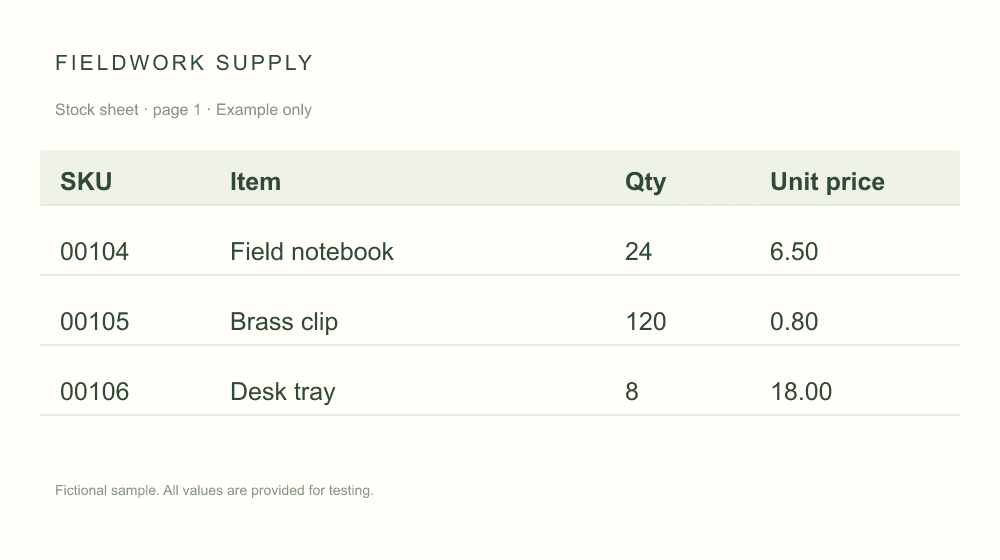
A table you can review, edit and merge
| SKU | Item | Qty | Unit price |
|---|---|---|---|
| 00104 | Field notebook | 24 | 6.50 |
| 00105 | Brass clip | 120 | 0.80 |
| 00106 | Desk tray | 8 | 18.00 |
Three steps, with you in control of the final result.
Add up to five clear table images with the same column headers. JPG or PNG, ready when you are.
Compare the extracted table with the original. Edit a cell or a heading, then mark each image as reviewed.
Matching tables become a single Excel sheet. Each row keeps its source filename, so you can trace it back.
A focused workspace for checking, correcting, and combining.
No switching between windows. Review the image and extracted cells together before anything goes into your spreadsheet.
Combine tables with matching column names and order. A mismatch is flagged before export.
Excel cells are exported as text. Keep leading zeros and written formats without silently turning identifiers into numbers.
Images and table drafts stay in this browser so you can continue later. Live recognition sends images to an AI provider, whose retention rules may differ.
Start with clear, printed tables and a visible header row.
Bring matching stock sheets into one place.
Keep item codes, descriptions, and prices together.
Move tabular report excerpts into an editable file.
Clear JPG or PNG images of printed tables, with a single visible header row. Each image can be up to 3 MB and 12 megapixels, with up to 100 rows and 20 columns. Handwriting, PDFs, and complex merged cells are outside this preview.
Yes. Add up to five images. Tables must have the same column names in the same order. Review each result first; the export will include a source filename column so every row can be traced back.
Yes. Edit cells and column headings beside the original image. After any change, check the table again and mark it as reviewed. AI extraction can make mistakes, so reviewing the result is part of the workflow.
Values are exported as text, including identifiers such as 00104 and amounts such as 6.50. Formula-like text stays text. If you need calculations, convert the relevant columns to numbers in Excel after checking them.
Drafts stay in this browser and tab, including across reloads and sign-in. Drafts from the last 24 hours can be restored; expired drafts are removed on your next visit. Clear deletes the draft. Our server does not store original images or extracted tables. The AI provider has its own retention policy. Use non-sensitive images during the trial.
This is an early preview. Each verified account gets 5 free conversions once: 1 credit per successfully recognized image, with failed attempts refunded. Credit purchases are not enabled and live recognition remains local-only. Pre-filled samples do not use credits.
Bring a clear table. We’ll help you get it into shape.
Try the converterJust exploring? Load the sample inside the workspace.